

Determining if a website is Google Indexed is a query that resonates with many web admins and site owners. While tools like Ziptie.dev offer excellent solutions, the landscape is vast with multiple methods, each with pros and cons. This guide will delve into the four most prominent techniques to address this concern. Google Indexing Issues can hinder a website’s visibility, making it imperative for web admins to keep a check.
From utilising the search console for insights to understanding the role of canonical tags in avoiding duplicate contents, comprehending these key terms can make a significant difference. Embarking on this journey will provide a holistic view of website indexing and its intricacies.
Join us as we explore and demystify the world of Google Indexing.
Four Techniques to Confirm Google Indexing for Your Web Page

Ever wondered, “Is my digital presence recognised on the world’s leading search engine?” You’re not alone. Figuring out whether Google has indexed your website can often feel like deciphering a cryptic code. Today, we pull back the curtain on four distinct methods to determine your website’s indexing status: Google Search Console’s arsenal, the handy “site:” command, and the innovative ZipTie.dev tool.
Discovering Your Site’s Status via Google Search Console’s Page Indexing Report
The Page Indexing Report within Google Search Console serves as a beacon for web admins, shedding light on which web pages have gained the nod from Google and which are lingering in the shadows. This treasure trove of a report unfurls:
- The tally of indexed pages.
- A snapshot of any indexing errors that might lurk.
- A provision for webmasters to “manually beckon Google’s attention” to specific pages they feel deserve Indexing.
Using Google Search Console’s Page Indexing Report to Confirm Indexing
- Dive into your Google Search Console account.
- Cherry-pick your desired website from the myriad properties.
- Navigate to the “Indexing” section in the left panel.
- Zero in on the “Pages” subsection within the Index realm.
A word to the wise, however! Often, the search console can play tricks on your technical SEO understanding. At first glance, the maze of “Crawled, currently not indexed” notifications might spell doom, suggesting a URL hasn’t been indexed. Yet, a closer inspection (sometimes using a simple Google search) might reveal the URL snugly sitting within the search results. Like mirages in a desert, such discrepancies can bewilder and wrench your optimisation endeavours.
Further muddying the waters is the search console’s restraint on reporting unindexed URLs. With a cap set at 1000 URLs for each report, smaller sites might find it accommodating, but behemoths, especially e-commerce juggernauts, find this limit a tad constraining.
Additional Factors Impacting Indexing:
- Robots.txt: A file that can allow or prevent search engine bots from crawling certain parts of your site.
- Crawl budget: The frequency and depth to which Google bots crawl your site. Essential for larger websites to ensure the right pages get priority.
- Canonical tags: This helps clarify the “master” version of content, warding off issues stemming from duplicate content.
- Sitemap: It is your site’s blueprint, guiding search engines to essential pages.
Understanding these intricacies, from robots.txt to sitemap, isn’t just a feather in a webmaster’s cap—it’s their shield in the ever-evolving battlefield of search engine dynamics.
Confirming Web Page Indexing via URL Inspection Tool on Google Search Console
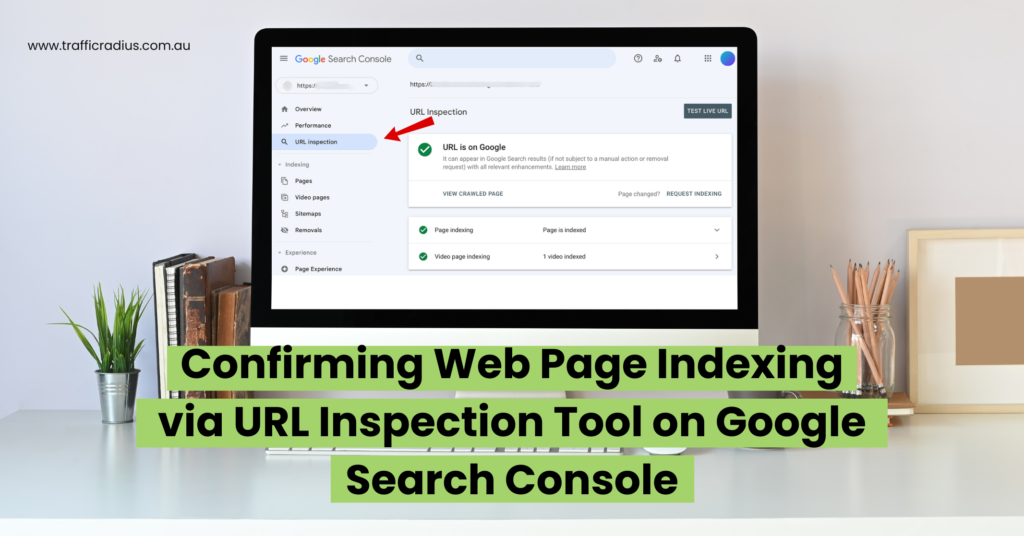
When navigating the vast cosmos of Google Search Console, the URL Inspection Tool emerges as a precision instrument, distinguishing itself from the broader Page indexing report. This tool offers a magnifying glass, focusing on the intricate details of individual URLs on your website. Through its lens, you’ll unravel:
- The binary verdict: Is your URL indexed?
- Potential roadblocks or technical SEO anomalies are preventing Indexing.
- A mosaic of other specifics and nuances associated with that URL.
- The golden opportunity is to beckon Google’s attention to re-crawl and re-index a URL.
Verifying Indexing Status with the “site:” Operator
- Dive into the Google Search Console universe.
- In the console’s heart, locate the “inspect any URL” chamber. For illustrative purposes, consider this specimen: https://www.example.com/insights/technical-seo/.
- The tool then unfurls the scroll of the verdict: Is your URL echoing in the chambers of Google?
Our example URL basks in Google’s limelight, indexed and flourishing. Delving deeper, one can discern why a page remains shrouded in obscurity. To illuminate yourself further, unfurl the “Page indexing” tab.
Moreover, navigate your ship to Pages > Page Indexing > “The Chronicles of Unindexed Pages” on Google Search Console for a panoramic view of all elusive pages.
The “site:” Command: The Oracle of Indexing
Wondering about another compass to navigate the search engine seas? Behold the “site:” command. This Google search operator conjures a list, revealing every page of a specific domain, basking in Google’s recognition.
Employing this sorcery is straightforward:
- Enter the mantra “site:” in the Google search bar, followed by your domain’s name (for instance, “site:mywebsite.com”).
- For a more focused revelation, like discerning the status of specific chambers within your domain, chant: “site:mywebsite.com/alchemy”.
This command is not just a tool; it’s a search results mirror reflecting your website’s presence amidst the boundless ocean of the internet. Remember, understanding intricacies like robots.txt, crawl budget, sitemap, canonical tags, and navigating potential duplicate contents are crucial beacons on this journey, ensuring you don’t sail astray.
How Dependable is the “site:” Operator for Indexing Checks?
The Google search’s “site:” command offers a tantalising glimpse into the indexed pages of a website. But here’s a caveat – it isn’t always the epitome of accuracy. Especially for digital behemoths with myriad pages, the command may only illuminate a fragment of the whole – occasionally as meagre as a mere 25%. Thus, while it is a handy tool for smaller web havens, its limitations are starkly visible when diving into more intricate digital realms.
While the “site:” command presents itself as a convenient compass in the vast ocean of Google searches, its reliability might waver, especially for larger digital realms. For diminutive web territories, it’s a swift gauge. However, the larger and more intricate your website becomes, the command might offer but a mere glimpse – sometimes, as startlingly scant as 25% of the entire empire.
As a beacon of truth, this command has its moments but isn’t infallible. Trusted navigational tools like ZipTie.dev and Google Search Console remain indispensable allies for a meticulous dive into your website’s Indexing.
Combining the “site:” Operator with a Specific Keyword to Verify Indexing
To sharpen the lens of the “site:” command, intertwine it with a keyword. This command dances with Googlebots, seeking pages harmonising with that keyword. Venturing with “site:example.com digitalalchemy”, Google unveils pages from example.com serenading the melody of “digitalalchemy”.
Witness the keyword light up within the search results snippet – a beacon indicating Google’s recognition of the page and its lyrical content. While this method offers a swift survey, always keep a diversified arsenal for verifying your “page not indexed” suspicions.
Using the “site:” Operator with a Text Segment for Indexing Verification
Harnessing the “site:” command intertwined with a fragment from your page, you can probe if Google acknowledges a specific narrative on your site.
The symphony of user experience dictates patience, as Indexing is an intricate ballet that does not play out instantaneously post-publication. Yet, if the fragment’s whisper echoes in the search results and is illuminated therein, it heralds that Google recognises the page and its embedded tales.
This becomes invaluable when you’ve crafted new chapters or revised old stories on your website, longing to discern if Google serenades the refreshed narrative.
ZipTie.dev: The Contemporary Indexing Compass
Within the digital cosmos, ZipTie.dev emerges as a sophisticated navigator. It bestows three insightful methodologies:
- Sitemap Crawl: A rapid reconnaissance, effortlessly skimming your sitemaps.
- URL List: A realm where you can inscribe URLs or bequeath a text file, perfect for scrutinising specific sagas or curated content.
- Crawl Feature: A relentless explorer, tirelessly traversing every nook of your website. With an adept understanding of internal linking, it unearths all intertwined URLs, ensuring an exhaustive indexing reconnaissance.
In this age, where structured data and HTTP Status code intricacies play pivotal roles and where the spectres of “page not crawled” or diminishing Google crawl budget loom large, we must have trusty tools and techniques in our arsenal. Whether it’s the swift “site:” command or the in-depth ZipTie.dev, understanding the rhythm of the indexing ballet becomes an art and science.
Steps to Ensure Your WordPress Site Gets Indexed by Google
While WordPress’s vast universe sometimes beckons plugins for optimisation, the quest for Indexing remains consistent across the digital spectrum. To certify that your WordPress citadel is recognised on Google, lean on the methodologies we’ve spotlighted previously. No singular realm, be it WordPress or otherwise, is exempt from the watchful gaze of Googlebots.
Conclusion: Ensuring Proper Indexing
To encapsulate, myriad pathways exist to discern if Google has etched your webpage into its vast library – with Google Search Console, the “site:” command. Every tool carries its bouquet of strengths and vulnerabilities. The mantra is to cherry-pick the one echoing the symphony of your enterprise’s nuances.
Suppose shadows of indexing dilemmas loom large; fear not. We at Traffic Radius stand ready. Our mavens will navigate the labyrinth of indexing challenges, ensuring a grander stage for your web pages in the Google Search theatre.
Yet should the spectre of indexation woes persist even after these solutions, it’s imperative to unearth the root. Venture into my article for a profound exploration of common culprits lurking behind the “page not indexed” or “page not crawled” conundrum. With an astute understanding of aspects like internal linking, structured data, user experience, and HTTP Status code, coupled with insights on Google crawl budget, the horizon of seamless Indexing becomes clearer.
Remember, in the intricate ballet of Indexing, every step counts, and every move is watched. Navigate wisely.