
🌟 Google Discover offers the opportunity to reach your desired audience without any cost. It can drive a substantial number of visitors to your website monthly.
Peruse this blog to gain insights into enhancing your Google Discover presence and boosting the likelihood of having your content featured in the Discover feeds of users. 🚀
What Exactly is Google Discover?
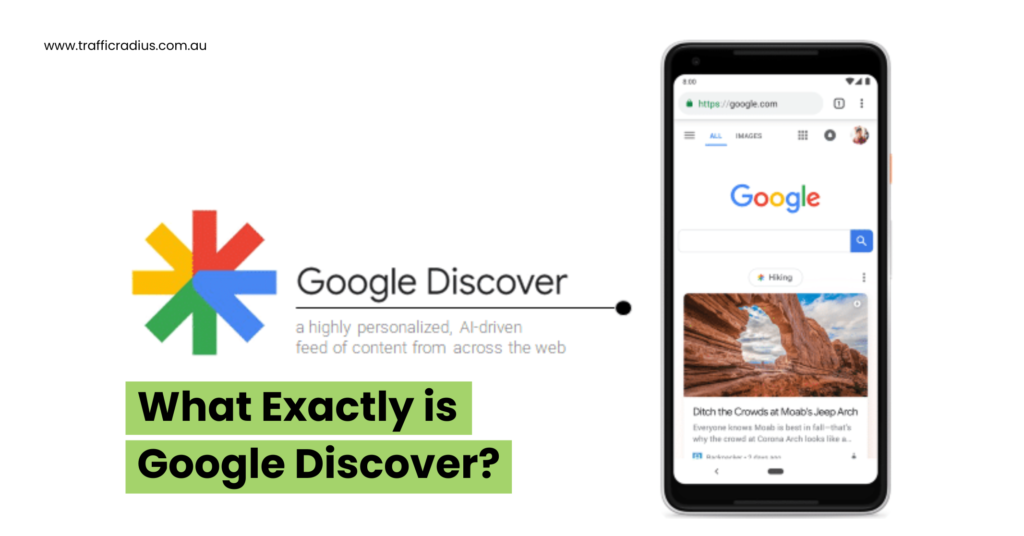
Google Discover serves as a feed that enables individuals to come across a content discovery that aligns with their interests. It showcases content by considering the actions users take within Google’s various services.
Google Discover can be accessed through the Google app and the mobile edition of Google Chrome
Is Optimising for Google Discover Worth It? ♂️
Indeed, it’s likely worth your while. Here’s the rationale:
- Enhanced visibility: Google Discover offers an avenue to present your offerings to your desired audience without any financial outlay. It’s an effective method to introduce your brand and content optimisation to potential new patrons.
- Generate traffic: Users don’t merely skim their Google Discover stream; they also engage by clicking through and exploring the recommended online destinations. Certain publishers, such as Condé Nast, see up to a fifth of their U.S. website traffic stemming from Google Discover.
- Foster recurring visits: Given that Google Discover permits users to follow publications, it can serve as a valuable source of recurrent visits to your website and help improve user engagement.
What’s the Mechanism Behind Google Discover?
For content to potentially feature in Google Discover, it must be indexed by Google and adhere to the content optimisation guidelines established by Google Discover. 🔍📈
It’s important to understand that meeting eligibility criteria don’t guarantee automatic display within Google Discover.
The appearance of the Google Discover feed bears a resemblance to social media feeds found on platforms like Facebook and Instagram.
Users can navigate through the feed, select the content that intrigues them and subsequently be directed to the website that houses the chosen content
Distinguishing Google Discover from Google News
Google Discover and Google News are distinct entities within the Google suite.
Google News operates as a news aggregator, primarily concentrating on present-day happenings and freshly released material.
Conversely, Google Discover’s objective revolves around presenting users with content aligned with their preferences, without regard to when it was published.
The Process Behind Crafting Your Google Discover Feed
Google explains that it employs the subsequent information to curate an individual’s Google app news feed:
- Web and app engagement
- Location records
- Location preferences
- Topics that you actively follow
Discover’s suggestions evolve with your continued utilisation of the feature, as Google progressively garners insights about your preferences.
To illustrate, suppose you cultivate enthusiasm for motorcycles and frequently explore websites and materials linked to that subject. In that case, Google Discover will progressively present you with a greater amount of motorcycle-related content.
The Assortment of Content in Google Discover
Google Discover mainly exhibits these four content categories:
- Article References: Links directing to online articles from diverse publishers. Each link takes the form of a card containing a headline and a small representative image.
- Web Stories: This format amalgamates video, images and audio—reminiscent of an Instagram story. For further insights into Web Stories, you can explore additional information here.
- YouTube Videos and Shorts: Google Discover feeds can also encompass YouTube videos and Shorts, suggested based on a user’s YouTube viewing history.
- Discovery Ads: Periodically, ads fashioned through Google Discovery campaigns also make appearances within the feed
Tracking Websites and Subjects
Within Google Discover, there’s a “Follow” functionality that permits users to monitor a website’s activity and has its most recent releases showcased in the “Following” section of Google Chrome. 🔍📰
This function employs a website’s RSS or Atom feed to exhibit the latest updates. If a website lacks these feeds, Google will generate one automatically.
Aside from websites, it’s also possible to track specific subjects, leading to a higher frequency of content related to those subjects appearing in your feed.
Users retain the power to regulate how often they encounter content tied to a particular subject by engaging with the toggle icon on a card and choosing between “More” or “Less.”
Enhancing Google Discover Visibility: 5 Effective Strategies
Let’s delve into the approach to gaining visibility on Google Discover. Implement these five recommendations to optimise your content for Discover: ✨📈
- Craft Exceptional Content
The initial stride towards achieving favourable outcomes with Google Discover centres around generating top-tier content. As per Google’s guidance, this entails crafting content that:
- Offers an all-encompassing exploration of a specific subject.
- Delivers original insights derived from analysis or research.
- Avoids mere replication or retelling of information from other sources.
Follow these guidelines to forge exceptional content:
- Commence with Thorough Research
- Laying the foundation for remarkable content necessitates a profound understanding of the subject you intend to cover.
Here’s how you can bolster your expertise on any given topic:
- Engage with existing web content related to the subject (e.g., blog posts, articles and guides).
- Probe discussions about the topic on platforms like Reddit and Quora.
- Seek out videos and podcasts addressing the subject.
- Conduct interviews with subject matter experts to glean unique insights.
- Embrace Comprehensive Coverage
- Strive to encompass the topic comprehensively, ensuring you incorporate all facets that individuals might seek information about.
Incorporate Data:
- Weaving studies or statistics into your content can augment its credibility and substantiate the assertions you put forth.
- Ideally, your content should feature data you’ve collected firsthand (e.g., through surveys) to enrich its substance.
- Alternatively, you can integrate secondary data gleaned from studies conducted by others or companies. If you opt for secondary data, remember to attribute your sources and provide links to the original research.
Enhance Your Titles:
- Once you’ve ensured the quality of your content, it’s crucial to optimise your titles for optimal visibility on Google Discover.
- Discover’s optimisation guidelines:
- Convey Value: Design titles that convey the potential benefits users could derive from engaging with your content (e.g., “Unlocking Your First $100 Online”).
- Evoke Curiosity: Infuse curiosity into your titles to heighten the likelihood of user clicks (e.g., “Comparing Eggs and Oatmeal: Unraveling the Healthier Breakfast Choice”).
- Incorporate Numbers: Utilise numbers to capture attention, as they tend to be attention-grabbing (e.g., “22% of Americans Lack Emergency Savings”).
- Avoid Clickbait: Steer clear of misleading titles as per Google Discover’s stipulations against deceptive content.
Here are several effective title formats to consider:
- List Structures (e.g., “10 Effective Side Income Avenues for the Year Ahead”).
- Interrogative “What” and “Why” Titles (e.g., “Unveiling the Reasons Behind Your Dog’s Smile”).
- Guidance through “How-to” Titles (e.g., “Correcting Your Posture: A Step-by-Step Guide”).
- Contrarian Titles Playing Devil’s Advocate (e.g., “Reconsidering Eggs: The Hidden Drawbacks”).
- Comparative Titles Posing a Versus Scenario (e.g., “Free Weights vs. Machines: Crafting a Muscular Physique”).
- Incorporate Captivating, High-Quality Visuals:
Google advocates for the integration of substantial, top-quality images to amplify traffic from Google Discover. As per Google’s directives, sizable images should be 1200 pixels wide or more, facilitated through the “max-image-preview: large” configuration. Vitality lies in ensuring the images you select directly relate to your content.
- Refrain from utilising attention-grabbing visuals that lack relevance to your content’s subject matter.
- Additionally, invest effort in selecting a captivating thumbnail image for your Google Discover content.
- It’s essential to steer clear of employing your website logo as the thumbnail image, as this contravenes Google’s guidelines. Moreover, avoid images with white backgrounds to prevent blending with Google Discover’s predominantly white user interface.
- Enhance Expertise, Authority, and Trustworthiness (E-E-A-T)
According to Google Discover’s documentation, the criteria it employs to gauge content’s utility often align with those utilised by Google Search. E-E-A-T, a pivotal consideration for Search, encompasses:
- Experience – Does the author possess experience with the subject matter?
- Expertise – Is the author adept in the subject area?
- Authoritativeness – Is the author (or the website) an authoritative figure regarding the subject?
- Trustworthiness – Is the author (or website) deemed reliable?
By exemplifying E-E-A-T principles in your content, you signify its value for user display. Here’s how to elevate E-E-A-T:
- Incorporate Personal Experiences: When plausible, integrate your personal experiences concerning the topic. For instance, if you’re composing an article about dog training, weave in your encounters with training your dog and the insights gained from the process.
- Showcase Your Proficiency: A prime method to exhibit expertise is by crafting an elaborate author bio that elucidates your standing as an expert in the subject matter. Components you might contemplate incorporating into your bio encompass: Your job designation, Years of experience, overview detailing your expertise in the subject, any media acknowledgments you’ve received and awards or distinctions Establish Authority in the Domain.
- Demonstrate Credibility: When assessing a page’s credibility, Google’s Quality Raters consider:
- The author: Who is the author? Do they possess the requisite authority to address the subject?
- The content: Is the content founded on factual accuracy? Does it reference credible sources?
- The website: Does the website emanate trustworthiness? Is its design void of deception or distracting ads?
- These parameters are elucidated in Google’s Search Quality Rater Guidelines.
- Optimise Your Content for Mobile Devices:
Given that Google Discover exclusively caters to mobile devices, it’s paramount to ensure your content and website are primed for seamless mobile browsing.
Adhere to these recommended practices to bolster your website’s mobile optimisation:
- Enhance Page Loading Speed: Modern-day expectations demand swift website loading times. Waiting for a webpage to load for more than a couple of seconds is now deemed cumbersome. In fact, should a webpage’s load time increase from one to three seconds, users are 32% more likely to abandon the site. Mobile users exhibit limited patience. They often engage with the web while on the move, during work breaks, or at mealtimes, leaving them with little tolerance for sluggish-loading websites.
To expedite your website’s loading speed, consider these strategies:
- Opt for image compression tools to diminish the size of high-definition images, which can considerably delay website loading. Alternatively, embrace file formats like WebP that offer small file sizes without compromising image quality.
- Streamline your website’s code by eliminating superfluous HTML, CSS, and JavaScript through minification. Leverage online solutions like Minify or plugins like WP Rocket.
- Employ a content delivery network (CDN) such as Cloudflare or Akamai to amplify page speed. CDNs dispatch website content from servers that are geographically nearest to users.
- Conduct an audit of your website utilising SEMrush’s Site Audit tool. This tool scrutinises your website for over 140 potential issues.
The intricacies of AMP are well-documented, though implementation may necessitate developmental resources that extend beyond this guide’s scope. For further insights, delve into our comprehensive AMP guide.
Post AMP implementation, you can verify the validity of your AMP pages through SEMrush’s Site Audit tool. 🔍📋
How to Increase Google Search Visibility? 🔍🚀
Boosting your search visibility on Google search entails employing various strategies and tactics to elevate your website’s ranking and prominence within search engine results. Here are several effective methods to contemplate:
Enhancing Search Engine Optimisation (SEO):
- Engage in Keyword Research: Identify pertinent keywords and phrases that your target audience employs while seeking your content.
- Refine On-Page Optimisation: Enhance your web pages by naturally integrating keywords into titles, headings, content, and meta descriptions.
- Cultivate High-Quality Content: Formulate content that is enriching, informative, and captivating, catering to your audience’s needs and preferences.
- Ensure Mobile-Friendly Design: Guarantee that your website is responsive and user-friendly on various mobile devices.
- Establish Reputable Backlinks: Garner links from esteemed sources within your industry, prioritising quality over quantity.
- Participate in Guest Posting: Contribute guest articles to authoritative platforms, accompanied by a link back to your site.
- Enhance Website Navigation: Facilitate easy information access for users through clear navigation menus.
- Augment Readability: Employ legible fonts, appropriate font sizes, and ample spacing to ensure content readability.
Conclusion
If you want to broaden your influence through Google Discover, you must
Leverage Google Discover as it presents a valuable avenue to increase website traffic and effectively engage your desired audience at no cost. 🌐📈
What To Do?
- Implement the Google Discover SEO recommendations provided earlier to refine your content for optimal Discover visibility.
- Monitor your page’s presence on Google Discover by using the Discover segment within Google Search Console.
- Further, improve your strategy by employing SEMrush’s On-Page SEO Checker tool to ensure your website aligns with Google’s on-page SEO guidelines.